What is dsh-desktop built with?
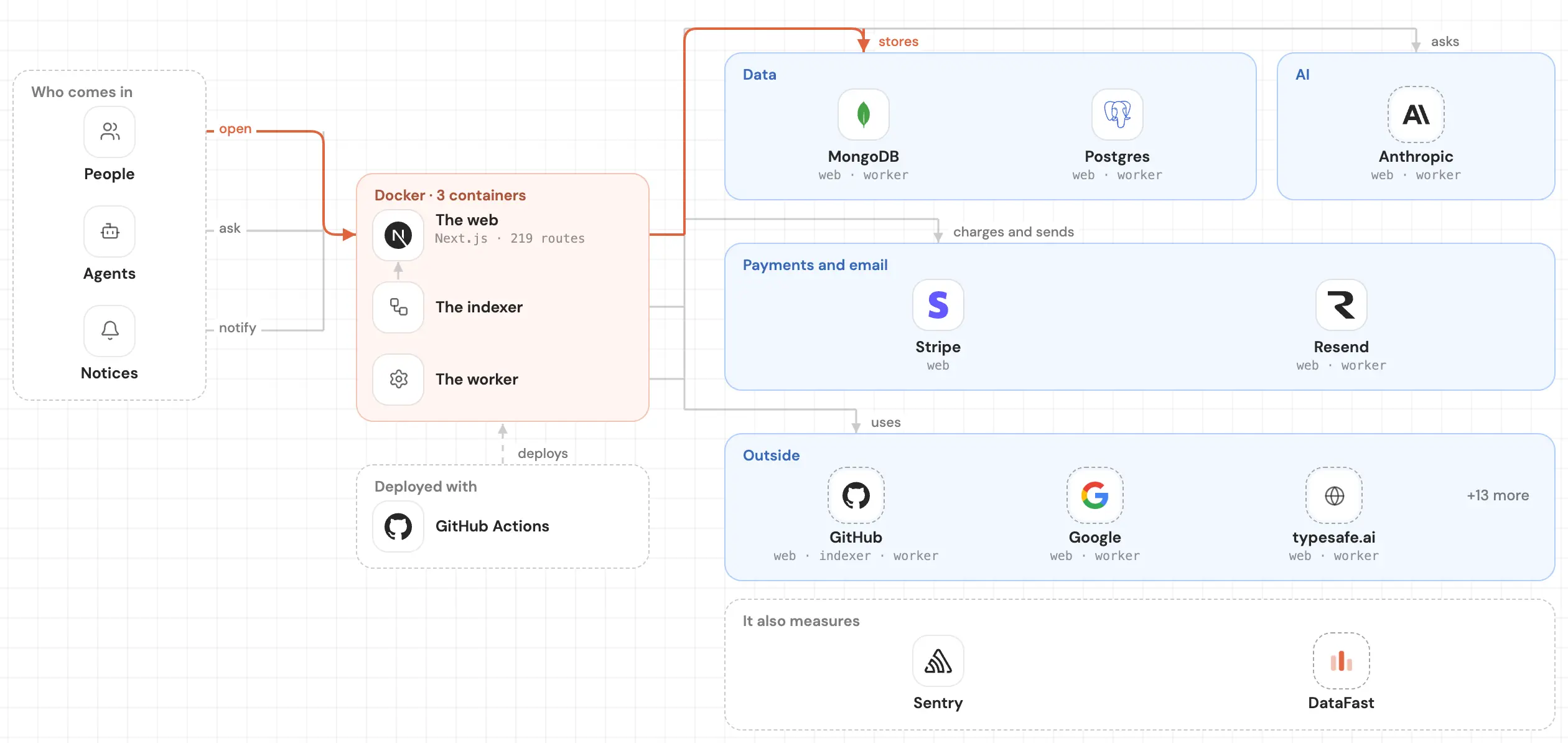
dsh-desktop is a TypeScript repo built with React, deepseek-ai, Vite, and Electron. It stores its data in deepseek-ai, signs people in with @deepseek-ai/dsh-deepseek-account, makes its content with sharp, yaml, @deepseek-ai/dsh-skill-office, mdast-util-from-markdown, mdast-util-gfm, and 2 more, validates its data with Ajv, ajv-formats, Zod, and @deepseek-ai/schemastery, and is tested with Vitest, Testing Library, and playwright. It has 207,417 written lines, with 477 test files.
 LinkedIn
Read on November 7, 2026, at commit 233b76c. Read it as markdown
Frontend
The base 2
Styles 4
@deepseek-ai/dsh-client-ui-theme5 files
class-variance-authority3 files
tailwind-merge1 file
- Tailwind CSS
Icons 1
- Lucide15 files
Backend
Data 1
Sign-in 1
AI 1
Support
The base 2
- Electron81 files
Content 7
yaml12 files
micromark-extension-gfm2 files
- sharp2 files
- mdast-util-from-markdown2 files
- mdast-util-gfm2 files
- mdast-util-to-string2 files
Validation 4
- Ajv3 files
- Zod1 file
- ajv-formats1 file
Testing 3
- Vitest429 files
playwright4 files
- Testing Library2 files
Tools 5
builder-util3 files
- @electron/asar2 files
@electron/fuses1 file
Other 7
fflate6 files
koffi4 files
- SemVer3 files
- selfsigned3 files
- adm-zip2 files
- clsx1 file
Other repos with a similar stack
Ordered by how much of its stack they share with dsh-desktop, then by stars.
- tashfeenahmedfreellmapi48k
7.4 billion tokens per month. 34 free LLM providers. 635 free model endpoints. All behind one /v1 endpoint, plus any custom OpenAI-compatible endpoint. Smart routing, automatic failover, encrypted keys. Personal experimentation only.
12 of 36 in commonCompare → - ruvnetruflo81.3k
🌊 The original agent harness. Deploy intelligent multi-player swarms, coordinate autonomous workflows, and build conversational AI systems. Features adaptive memory, self-learning intelligence, federation, vector RAG integration, and native Claude Code / Codex / Hermes and many more Integrated
11 of 36 in commonCompare →
Frequently asked questions
What language is dsh-desktop written in?
What framework does dsh-desktop use?
The proof: in dsh-desktop-next/package.json
What database does dsh-desktop use?
What does dsh-desktop sign people in with?
Does dsh-desktop have tests?
Which repos have a stack like dsh-desktop's?
See inside your code, today.
Paste your repo and see it drawn, part by part: a medium one in under a minute.
Free, no account.
Is it your repo? Add its badge, keep it up to date or take it down →


