What is certimate built with?
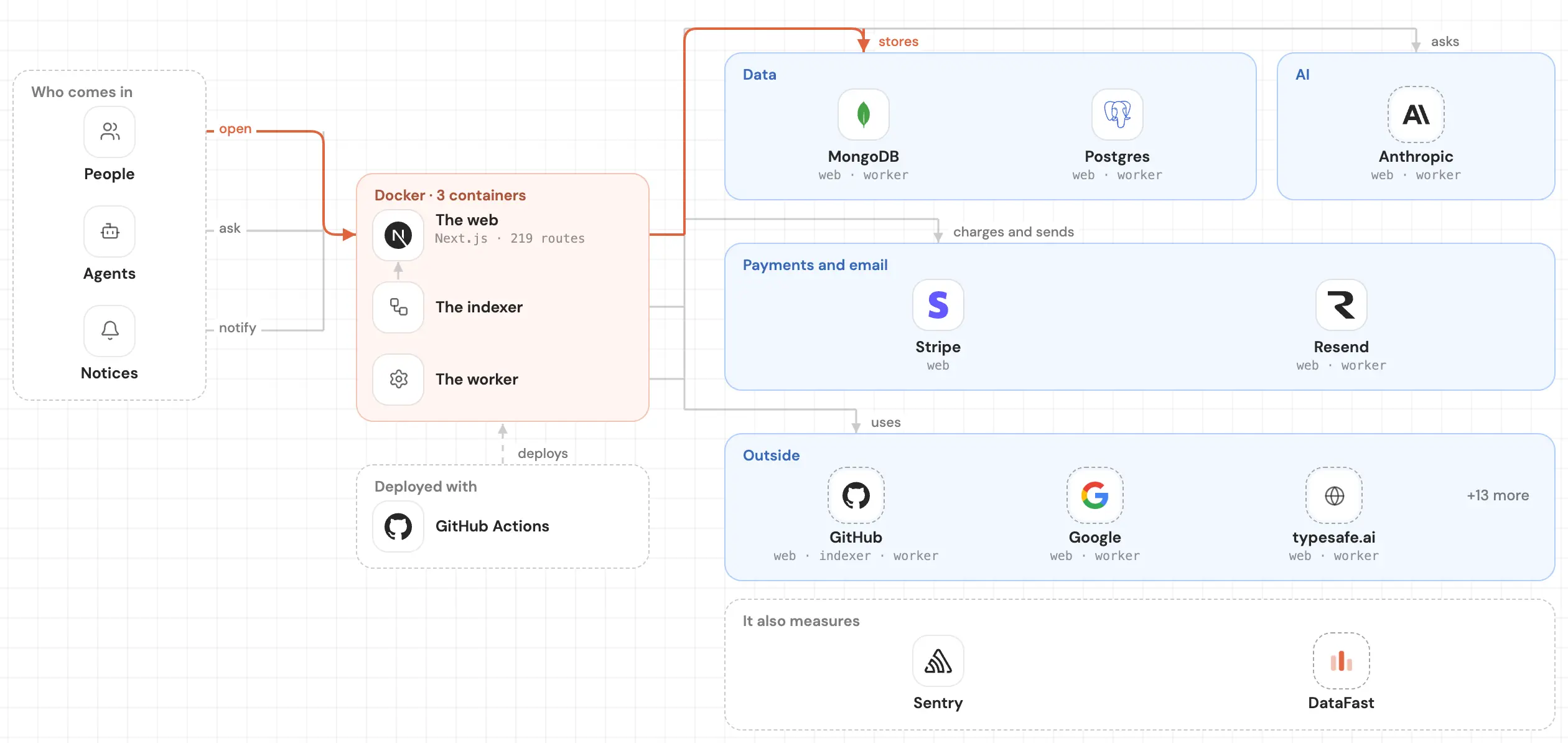
certimate is a Go repo built with Vite, React, react-router-dom, and React Router. It reaches its data with github.com/pocketbase/dbx, signs people in with github.com/aws/aws-sdk-go-v2/credentials, golang.org/x/oauth2, github.com/Azure/azure-sdk-for-go/sdk/azidentity, github.com/pavlo-v-chernykh/keystore-go/v4, github.com/pquerna/otp, and 1 more, makes its content with github.com/wneessen/go-mail, github.com/microcosm-cc/bluemonday, and yaml, validates its data with Zod and @peculiar/asn1-schema, is tested with github.com/stretchr/testify, runs in production with github.com/go-acme/lego/v5, github.com/ucloud/ucloud-sdk-go, github.com/tencentcloud/tencentcloud-sdk-go/tencentcloud/common, github.com/aws/aws-sdk-go-v2, github.com/aws/aws-sdk-go-v2/config, and 7 more, and uses github.com/qiniu/go-sdk/v7, github.com/baidubce/bce-sdk-go, github.com/jlaffaye/ftp, MinIO, and pocketbase. It has 175,635 written lines, with 211 test files.
 LinkedIn
Read on November 15, 2026, at commit a27637a. Read it as markdown
The card says what it's built with. Its whole map opens it up: every part of the code and how it connects to the rest.
Frontend
The base 4
React80 files · in ui/package.json
react-router-dom16 files
Vitein ui/package.json
Styles 3
@uiw/codemirror-theme-vscode1 file
- Tailwind CSS
- cn1 file
Interface 5
antd386 files
flowgram.ai52 files
- CodeMirror1 file
- react-copy-to-clipboard3 files
Icons 1
@tabler/icons-react64 files
Backend
Data 4
pocketbase14 files
github.com/baidubce/bce-sdk-go7 files
- github.com/qiniu/go-sdk/v78 files
- github.com/jlaffaye/ftp2 files
Data access 1
- github.com/pocketbase/dbx22 files
Sign-in 6
github.com/aws/aws-sdk-go-v2/credentials9 files
- golang.org/x/oauth22 files
- @peculiar/asn1-pkcs81 file
- github.com/Azure/azure-sdk-for-go/sdk/azidentity1 file
- github.com/pavlo-v-chernykh/keystore-go/v41 file
- github.com/pquerna/otp1 file
Services 1
Support
Content 3
yaml2 files
github.com/microcosm-cc/bluemonday1 file
- github.com/wneessen/go-mail2 files
Testing 1
github.com/stretchr/testify206 files
Deploy 12
github.com/go-acme/lego/v591 files
github.com/ucloud/ucloud-sdk-go43 files
github.com/nrdcg/oci-go-sdk/common/v10652 files
- github.com/tencentcloud/tencentcloud-sdk-go/tencentcloud/common31 files
- github.com/Azure/azure-sdk-for-go/sdk/azcore1 file
Tools 2
- github.com/spf13/cobra4 files
- github.com/aws/smithy-go2 files
Validation 2
- Zod312 files
- @peculiar/asn1-schema1 file
Other 37
github.com/samber/lo143 files
github.com/go-resty/resty/v274 files
- PocketBase49 files
ahooks39 files
- Google36 files
github.com/huaweicloud/huaweicloud-sdk-go-v328 files
dayjs12 files
- Immer12 files
zustand7 files
nanoid6 files
github.com/go-viper/mapstructure/v23 files
- i18next2 files
- Alibaba Cloud1 file
github.com/go-cmd/cmd1 file
github.com/pkg/sftp1 file
i18next-browser-languagedetector1 file
peculiar1 file
- Yandex Cloud1 file
- react-i18next380 files
- github.com/alibabacloud-go/darabonba-openapi/v251 files
- github.com/volcengine/volcengine-go-sdk44 files
- github.com/alibabacloud-go/tea36 files
- github.com/volcengine/volc-sdk-golang3 files
- golang.org/x/crypto3 files
- golang.org/x/sys2 files
- software.sslmate.com/src/go-pkcs122 files
- cron-parser1 file
- file-saver1 file
- github.com/alibabacloud-go/openapi-util1 file
- github.com/Azure/azure-sdk-for-go/sdk/security/keyvault/azcertificates1 file
- github.com/xhit/go-str2duration/v21 file
- golang.org/x/sync1 file
- k8s.io/api1 file
- k8s.io/apimachinery1 file
- k8s.io/client-go1 file
- reflect-metadata1 file
Other repos with a similar stack
Ordered by how much of its stack they share with certimate, then by stars.
- prometheusprometheus67.7k
The Prometheus monitoring system and time series database.
13 of 82 in commonCompare →
Frequently asked questions
What language is certimate written in?
What framework does certimate use?
The proof: in ui/package.json
What does certimate sign people in with?
What services does certimate use?
Does certimate have tests?
Which repos have a stack like certimate's?
See inside your code, today.
Paste your repo and see it drawn, part by part: a medium one in under a minute.
Free, no account.Private repo? Sign in with GitHub
Is it your repo? Add its badge, keep it up to date or take it down →


