Guide
How to understand a repo you didn't write
Your agents wrote most of it. Here's how to know what's inside, what changed and what to fix, without reading the code.

Ronaldships
3 min read
You asked for a feature. Your agent wrote it, pushed it, and moved on to the next one. By Friday there are forty commits in your repo, and you couldn't say which parts of your product they touched.
That's normal now. Agents push faster than anyone can read. The good news: you don't need to read the code to understand your product. You need to know where to look.
Start with the shape, not the files
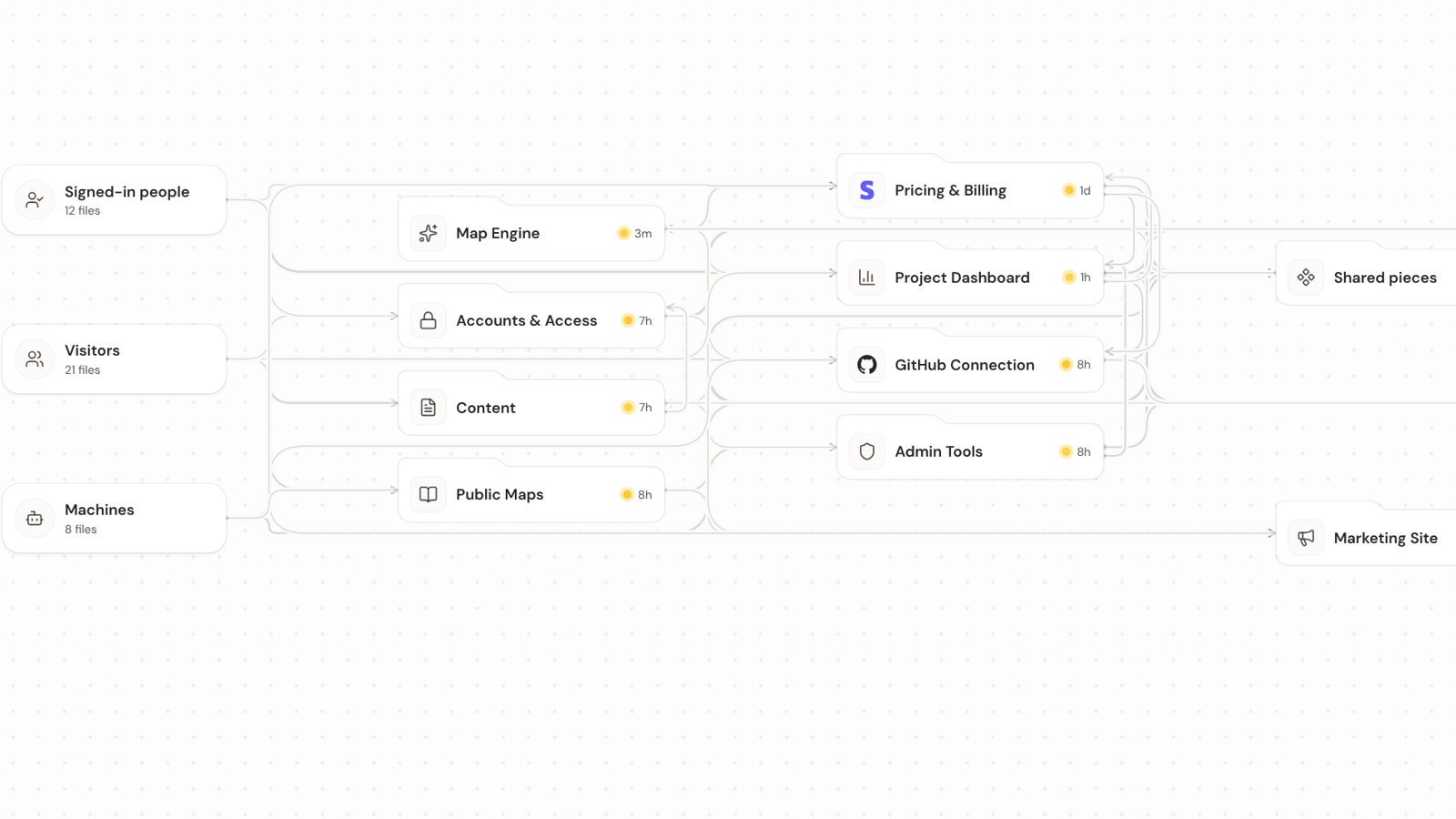
A file list tells you almost nothing. utils.ts, index.tsx, route.ts: every project has them. What you want is the shape of your product, and every product has the same one if you read it from left to right.
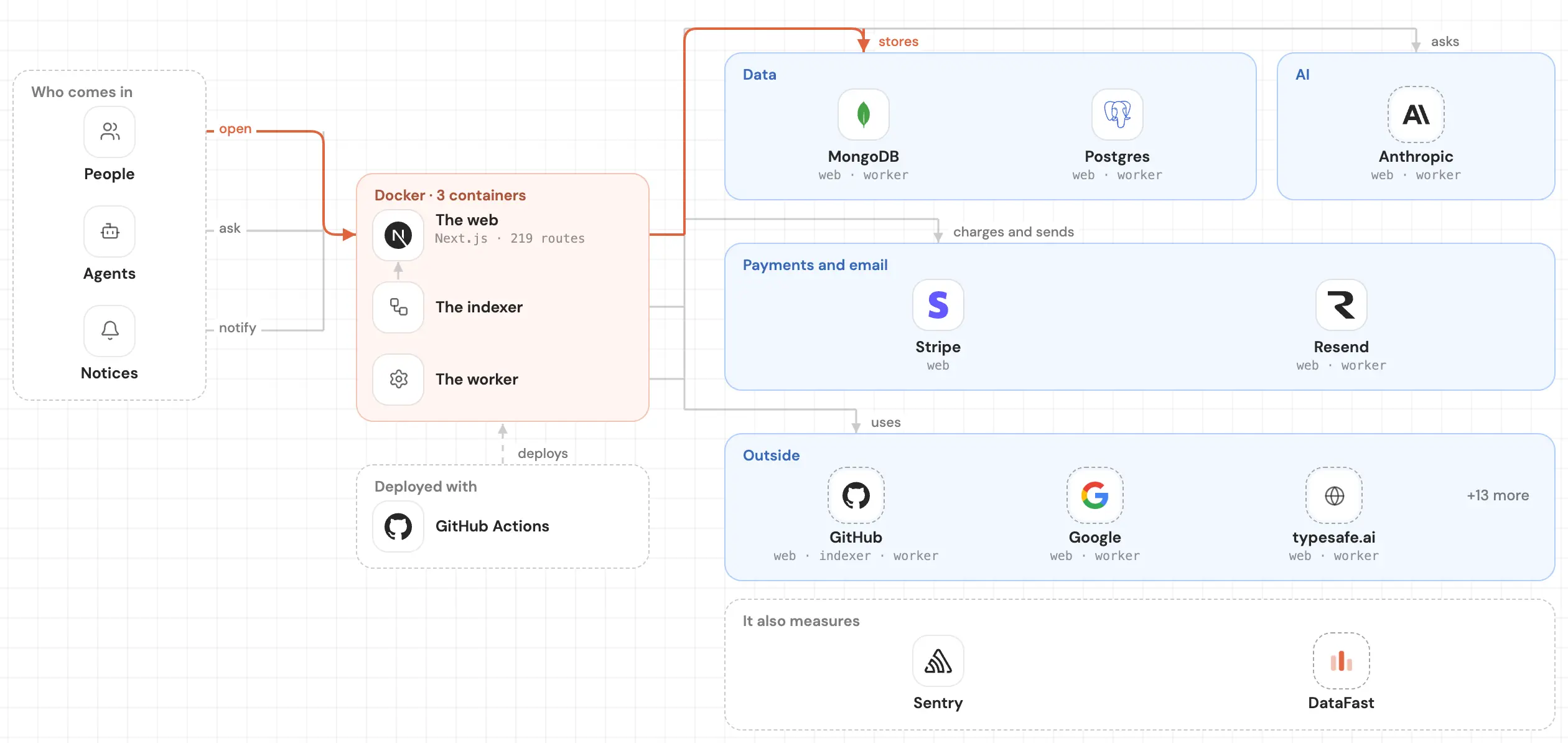
- Who comes in. Visitors who haven't signed in, people with an account, other programs calling your API, and tasks that run on a schedule.
- What the product does. The screens people see, the actions behind the buttons, the pieces several parts share.
- What it keeps and what it calls. Your data, table by table, and the services it talks to: payments, email, AI, storage.
Once you see those three columns, a lot of questions answer themselves. Who can reach the checkout? What writes to the users table? What happens if the email service goes down?
Then look at what changed
The shape tells you what you have. The next question is what moved. Not "which files changed", but "which parts of my product changed this week, and who changed them".
That's the question to ask after a busy week with your agents. It tells you what to try before you ship, and what to ask your agent about.
Then look at what's worth fixing
Some things don't break today but will hurt later: tests that fail, busy code that no test covers, files nothing uses anymore, packages you installed and never import, files so big that changing one line means reading thousands.
You don't have to find these yourself. You have to know they exist, and hand them to your agent with the right files.
Before you ask for a change
One more habit pays off. Before you ask your agent to change something, check what that part connects to. A small edit to the part that handles money can reach a lot of places. If you know which ones, you can tell your agent what not to break, and you know what to try afterwards.
How SeeRepo helps
SeeRepo reads your GitHub repo and draws it as that left-to-right map: who comes in, your product, its data and services, with cables between the parts. Every part can be a module of its own, and you double-click to go inside. See Modules and parts.
- A sheet for every part. Click a part to read what it does in plain words, what it gets from and sends to, whether tests cover it, and who made it, people and agents. See A part's sheet.
- What changed this week. A part that changed in the last 7 days glows amber, and the filter can show only what your agent changed. See Heat and recent changes and the guide See what your agents changed this week.
- The activity. In Journey, a chart of its whole life: tap a day and see what happened.
- What's worth fixing. Health lists the tasks, the most serious first, and each one comes with a prompt you copy and paste into your agent. See Health and Hand your agent the files worth fixing.
- What a change can reach. A part's sheet tells you what it connects to before you ask for the change. See See what a change can reach before you ask for it.
- A map you can share. Turn on the public map and anyone with the link sees how your product works and how it's built. Never the code.
The code is read to draw the map and isn't kept. SeeRepo only reads: it never writes to your repo.
You don't have to become someone who reads code. You have to know your product as well as your agents do. A map gets you most of the way there.