Health
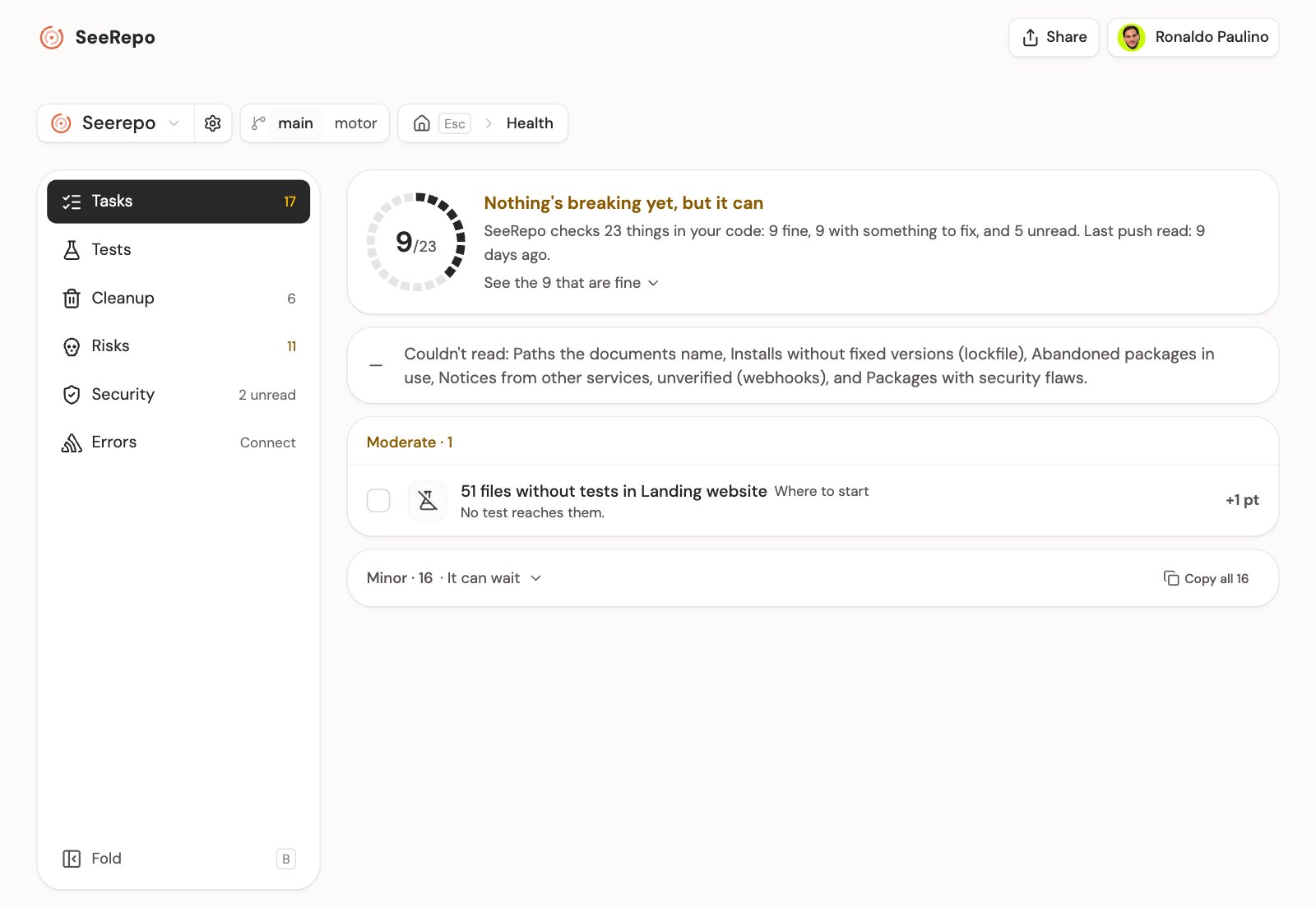
Health, folder 1 in the dock, tells you what's worth fixing in your repo and where to start. Each task opens its sheet with what SeeRepo found and a prompt ready to paste to your AI agent.
Its sections
The dock changes module and the menu on the left changes section. Each row says how many things it has open, or carries a green check if it came out clean. If one is serious it says so with its word and in red: 1 serious. Failing, in red too, means your tests are broken. In grey goes what a section has to say with nothing open: 2 unread if something couldn't be read, and in Tests Not running or By hand if they don't run on their own.
- Tasks: everything open, in one list.
- Tests: whether your tests run on their own on every change and whether they pass, day by day, and what part of each module they touch. On top it says how the last day with tests ended and which day it was: Passing · last run today. If they only run when someone starts them, it says Manual only: they don't count as tests that warn you on their own. If they don't run on their own, Copy prompt to make them run on their own gives you the message for your agent.
- Cleanup: files and packages nobody uses, and what your files offer without anyone asking.
- Risks: parts without tests, areas that change a lot, abandoned packages and undone changes.
- Security: keys in the code, packages with known flaws and what was left open by accident.
- Errors: what breaks for people in your published app, with Sentry. It only shows if your code uses Sentry. If you haven't connected it, it's where you connect it; if it's connected, it says when it read it, and if SeeRepo couldn't read it, it tells you instead of calling it fine.
Esc goes up from a section to Tasks, and from there to the project. The page's address carries the section, so back returns to the previous one, reloading leaves you where you were and you can send the link. On a phone the menu unfolds when you tap the section you're in. Beside its ring, each section says the last push SeeRepo read (in Errors, when it read Sentry): that's how far what you see goes.
The tasks
If something got fixed since your last visit, a line on top says so, once: «Since your last visit, 2 got fixed», naming the first one. It only counts what SeeRepo checked was fixed.
On top, the ring: of what SeeRepo checks in your code, how much is fine. Its line splits the count: how many things are fine, how many have something to fix and how many couldn't be read. A check can open more than one task, so that figure isn't the count of your tasks. Its filled pieces are what's fine and only turn green when all of them are; the colour of the most serious goes on its title. Its line says when it was read, and what couldn't be read shows below, by its name; if nothing is open and that's all that's left, it says so: "Only this is left to read to close the ring". Below, the tasks by severity. The first row carries Where to start: it's the one worth fixing before any other. Within the most serious, first comes what's happening to your people, then what's exposed, what's broken, the open doors and the risk in what you use. If everything is minor, none carries it. No row has a button: the prompt is copied from the task's sheet, or with the checkboxes. At the end of each row goes what fixing it gains the score, as +15 pts. If a section's tasks already hit its cap together, those rows carry no figure, and in their section the first group's title says so.
Each group is a severity, and each task has its kind's icon: Serious, something breaks or is exposed; Moderate, nothing breaks yet, but it can; Minor, it can wait. Copy all 7, on top of a group, copies one prompt with all its tasks, so your agent can fix them in one go. With the boxes you pick only the ones you want, in any section: X picks the row you're on and C copies. The New mark is what opened since your last visit in that browser. In Tasks, the parts without tests are one row, which says how many tasks they are and takes you to Risks, where each one is listed.
A task's sheet
Tap a task and its sheet opens over the page, which stays behind, blurred (on a phone, full screen). At the top left you go to the previous or the next without closing it, with ← → too, and Copy link gives you its address to send to whoever will fix it. It closes with Esc, tapping outside, with its handle or with the X. It has three columns:
- What's going on: what's happening, said once, with its proof under it: each package with its version jump, each production problem told in an everyday sentence, with who it happened to and its link to Sentry, each file with its figure and its module.
- Why it matters and when: what leaving it costs you, what fixing it gains the score, and its story: the push that brought it, since when it happens in production, or whether it's still like this in your last push.
- Fix it with your agent: the prompt, to read before you copy it, with Copy prompt (on a phone, fixed at the bottom, and when you copy it tells you right there what to do with it). When the fix changes code, it ends with how to check it: your project's test command, from the folder its files are in. When your agent fixes it and you push, the task closes by itself. The ones a change doesn't close (a zone that changes a lot, an undone change, agents going round or tests that fail at random) leave by themselves as the days go by, once it stops happening: their sheet says so, and its title is Go over it with your agent.
The page's address carries the open task (?task=), so you can send the link to whoever will fix it, and the email of a serious task opens its sheet.
What your tests touch
In Tests, each module with the part of its files that some test uses, and a sentence that sums it up. First, under their own title, the ones that change a lot: touched often and left with little or no test. It's the part of the files some test uses, not how much they check. Tap a module and its sheet opens: how many of its files the tests reach, the ones missing (what changed most first) and the prompt to write them. If that module has its task open, See its task takes you to it.
The score
The image to share and your agents give you your repo's score: from 0 to 100, with its band in words, decided by the most serious thing open. In Health you see it by what each task gains (+15 pts):
- Needs attention, from 0 to 54: something breaks, like failing tests.
- Fair, from 55 to 79: nothing breaks, but parts that change a lot have no tests.
- Good, from 80 to 100: what's open is cleanup, or nothing is open.
Share it
In Share, at the top right, The image of the health draws your score in a square image: the ring, the band and what each dimension takes, without naming any task or file. You can copy it, share it or download it. When there is nothing left to fix, Tasks offers it right there, with Share the image.
In the project, the Health folder shows the same ring Tasks opens with, how many things there are to fix and how that changed. It counts what's open as this list does: the errors of one page, as one. Your agents read the same, and whether you can ship, through the API, the MCP (health) and the CLI (seerepo health).
The kinds of task
Each task falls in one of the score's dimensions.
Tests
- The automatic tests fail: the commit that broke them and the files it touched. See in Journey when they broke opens Journey, where a post says the day: "The automatic tests broke".
- The project has no tests: nothing protects its parts. It weighs more while they're changing.
- Tests that can't be trusted: commits that failed and then passed with the same code, just by running the tests again.
Security
- Secrets in the code: a service's keys written in a file, which anyone who reads it can use.
- Settings files in plain sight in the repo: a
.envcommitted with its values. - Notices from other services left unchecked (webhooks): they take them without checking who sends them, so anyone can send a fake one.
- Addresses that don't ask to sign in, though the others do: other routes of the project ask for a session, but these don't.
- Packages with security flaws: versions you use with a published flaw anyone can read about.
- Tables anyone can read and change: Supabase tables without access rules, which open with the public key.
What breaks for people in your app (with Sentry)
- An error on a page: what broke for someone in production, with who it happened to and when; the errors of one page go together. Its sheet tells in one sentence what that person lived, with no technical words, and the error as Sentry keeps it is a click away.
- Slow queries: queries to your database that take too long when someone opens a page.
- The database didn't hold: your app couldn't talk to it.
Risks
- 4 files without tests in Checkout: a module where no test reaches 3 files or more, at least half of it. It weighs more while they're changing, and however the map cuts them, what no test reaches counts as one cause.
- Settings with no explanation: variables the code reads and the
.env.exampledoesn't list. - Big files that keep changing: 500 lines or more, changed on 3 days or more this month. Where size and change meet is where things break most.
- 2 changes had to be undone: the ones of the last 7 days. Something went in before it was ready.
- Files the agents rewrite over and over, this week: the sign of an agent going in circles without solving it.
- Each install can come out different: without pinned versions (lockfile), each install may bring others.
- Abandoned packages: their authors marked them abandoned.
- Sentry doesn't see the code and Sentry is missing its key at publish time: your errors come without saying where they happen.
Cleanup
- Files nothing uses: "No other part of the product uses them."
- Installed packages nothing uses: they're on the list to install, but no code and no command uses them.
- Giant files: over 1,000 lines. "An agent reads it whole to change a single line."
- Files where nothing warns you if something doesn't add up:
any, ignores or disabled rules, where the compiler stops warning. - Copied code: the same code written twice, in two files. "A fix in one copy never reaches the other."
- Files in a circle: files that use each other. "To change one you have to understand them all".
- Files that carry things nobody uses: functions, components or values a file offers the others (export) that no other file uses. In JavaScript and TypeScript.
- Two libraries for the same job, like dates, icons or forms: they weigh double and each agent picks a different one.
- Files that shouldn't be here: generated or heavy files that are committed.
- Paths the documents name: a file your README, AGENTS.md or CLAUDE.md names and the repo doesn't have. A line that already says it's gone doesn't count, and the prompt asks to fix the document, not the code.
- Pending notes in the code (TODO): comments that leave something for later. A TODO or a FIXME counts only when it opens the comment or comes right before ":" or "(", so a Spanish "TODO el…" that means "all" doesn't.
Fix one with your agent
- Tap the task: its sheet opens.
- If you want to see where it lives, tap See where it is.
- Tap Copy prompt.
- Paste it into Claude Code, Codex, Cursor or the chat of your app builder.
Each prompt says the problem and your repo, lists the files (up to 200, then "…and 12 more."), and asks for the fix. For example, for files nothing uses:
In my project your-name/your-repo, no file of the product imports these files:
- …

Check each one (look for dynamic or convention-based uses too) and delete the ones that are really unused, with their tests. Tell me what you deleted and what you kept, and why.
After you copy it: "Paste it into Claude Code, Codex or Cursor: it will know which files to read."
On a public map, a visitor sees Health without your security holes, without what breaks for people in your app and without your pending notes, and opens each sheet without the prompt. On top, the title speaks only of what's shown ("Of what's shown here, nothing's breaking yet, but it can") and a line says Only its owner sees Security. What they read doesn't say "your": "The automatic tests fail", not "Your tests…".
What you marked
If a task doesn't apply to your project, its sheet gives you Copy prompt to mark it: the message for your agent to mark it false or set it aside. It doesn't show on security tasks or on the ones that come from Sentry, which the connector won't mark. What you or your agent marked false, put off or accepted goes at the end of Tasks, with its reason. It doesn't count in the score or in what's open, and Undo brings it back. If one file of a task was marked false, only that file shows there and the task goes on with the rest. What each agent did, with its date and how, is in Settings, under API. On a public map, a visitor sees what's marked without the reason and without the button: hiding it would let you take off your page what doesn't suit you.
On a free repo
You see the ring, how many things each section has and the title of the first. The rest come blurred, without a name: which ones they are, how to fix them and their prompts come with a plan.