Structure
Structure, the map folder in the dock, shows your project as read from its code. On the left, a menu with its questions: Blueprint, Technologies and Modules, each with its short answer: how many pieces run, how many tools it's made with and how many modules changed in 7 days. Under Modules go all your modules, so any of them is one touch away from anywhere. Going in opens the first one your project has, and each has its own link. On a phone, the menu unfolds in place.
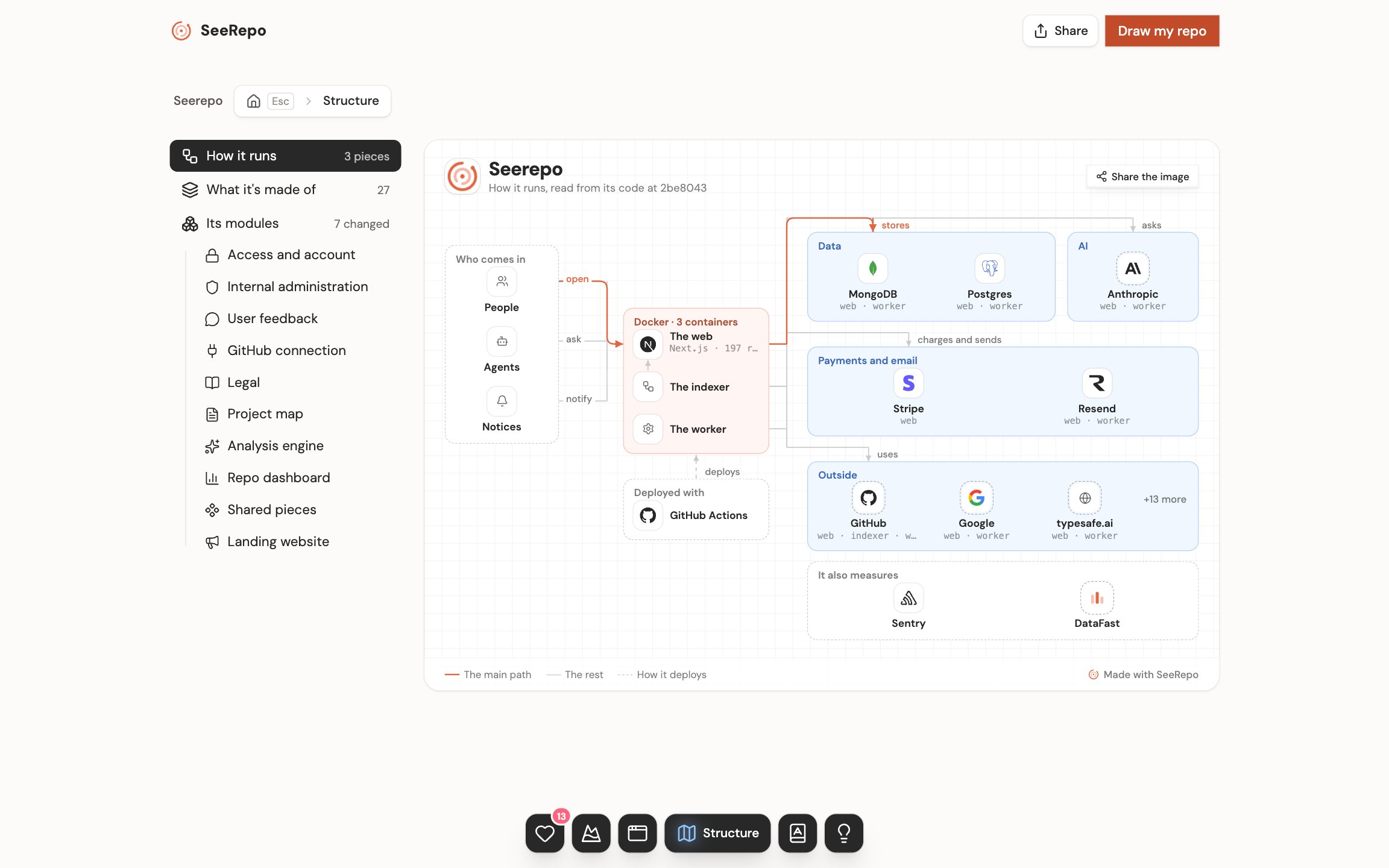
What's new since your visit
At the top, on the project, one line says which modules were touched since your last visit, the busiest first. If nothing happened, it doesn't show. Only the owner and their members see it, each from their own visit.
If there were pushes since your last visit, See what happened while you were away shows up on top: in about 20 seconds, each push runs to its module with the face of who made it and its line. What you already watched isn't offered again, and you can stop it whenever you want. Only the owner and members see it, with a plan.
Blueprint
On a wide screen it's a plan that fits whole in a screenshot: with your project's name, a verb on each arrow, what's yours in soft orange and what it uses in soft blue. Share the image gives you the whole plan, ready to post: in its window, Copy image and Download, and on a public map Copy link too. Beside the menu it's drawn smaller than its size: there View larger opens it whole and at its own size, over the page, still alive. On a narrower screen it reads going down, with the same pieces.
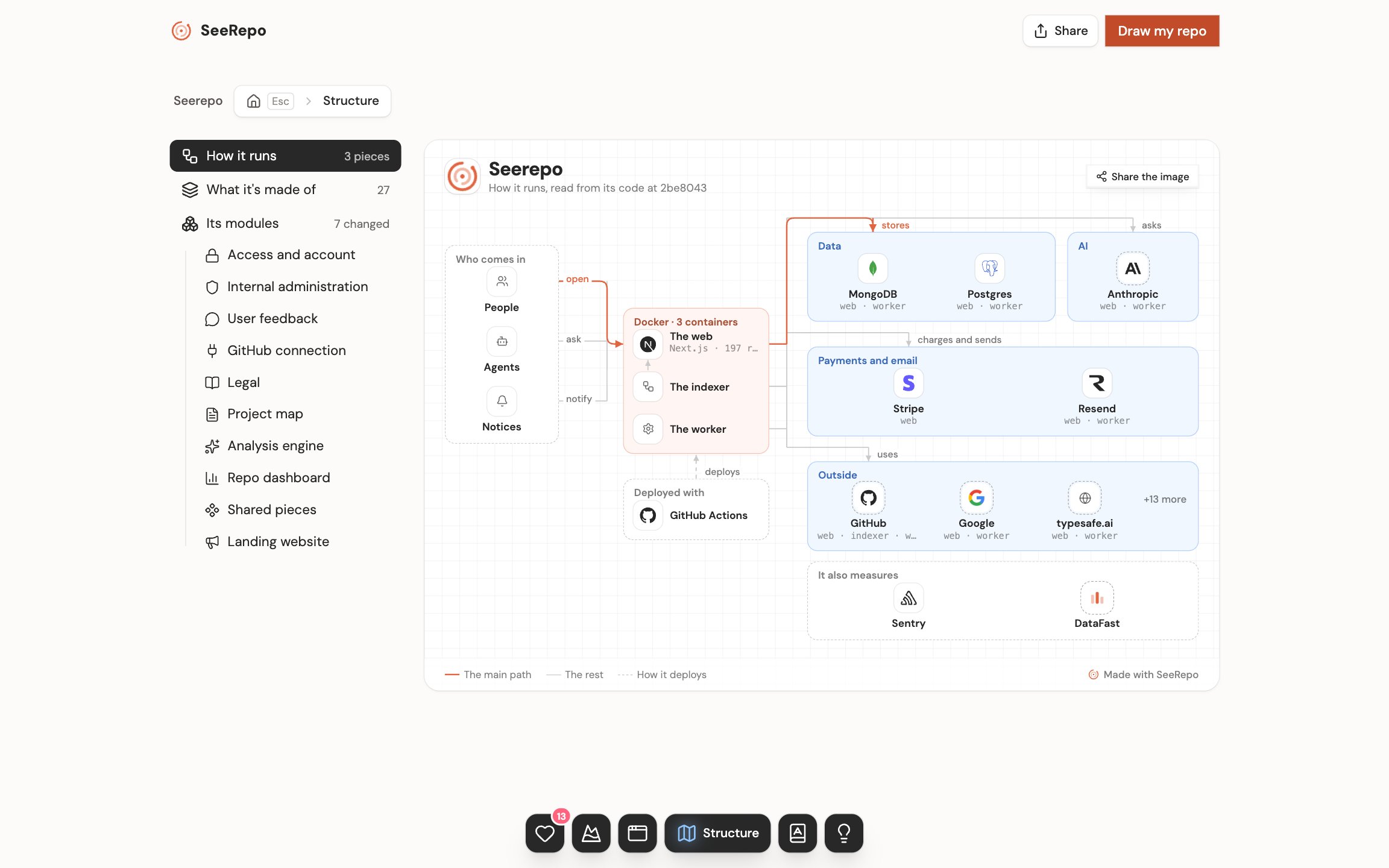
- On the left, who comes in: people, agents, notices from other services and scheduled tasks.
- In the middle, what runs, in the boxes it lives in: "Docker · 3 containers". Under them, how it's deployed; if the code doesn't say, it says: "How it's deployed: the code doesn't say."
- On the right, what it uses, by group: data, AI, payments and email, messages and what's outside. Each group shows up to four rows: with more, three and "+N more", which opens the list of the rest when you touch it, each with its logo. Under them, what only measures, with no lines.
- One line alone goes in color: from people to the web, and from there to its main database.
- A dotted tile is what the code only suggests: an address or a variable, without its SDK.
- Point at a piece, or reach it with the keyboard, and the plan's foot says what it does and which file it comes from.
- At its foot, which version of your code it was read from and on which day, like "Read from its code at 2dfdf35, on Oct 29, 2026", and the legend: the main path, the rest, how it's deployed and what's dotted.
- A library runs nothing by itself, and there this drawing doesn't show.
Modules
On a wide screen, its modules are a plan that fits whole in a screenshot. On the left, who comes in. In the middle, your modules by layers: what people open, what works behind, and the base the others use. On the right, its data and what it uses through a library.
That list isn't the Blueprint's, which is why they don't add up to the same. The Blueprint counts every service your product talks to: the ones it uses through their library and the ones a process calls by their address, with no library, or that the code only suggests. The Modules plan lists only the first kind, the ones whose calling files are known.
If more than 30 % of your project's files sit in boxes the map didn't design, the "+N more" ones or those named by letters, above your modules it says Half-made map with its share: what's below is the designed part, not the whole project. The API and the MCP say it the same way.
If the map was written in a language other than the app's, it says so above your modules, like "Map written in Spanish": their names are the ones its reading gave them, and they stay. Its owner gets Change, which goes to the project's settings.
Each piece has its name and one short fact. Point at it to read what it does, and on a module what it touches stays lit, with its figure: → what that module uses and ← what uses it. "Share the image" gives you the whole plan, without those figures. Touch a module, here or in the menu, to go inside it.
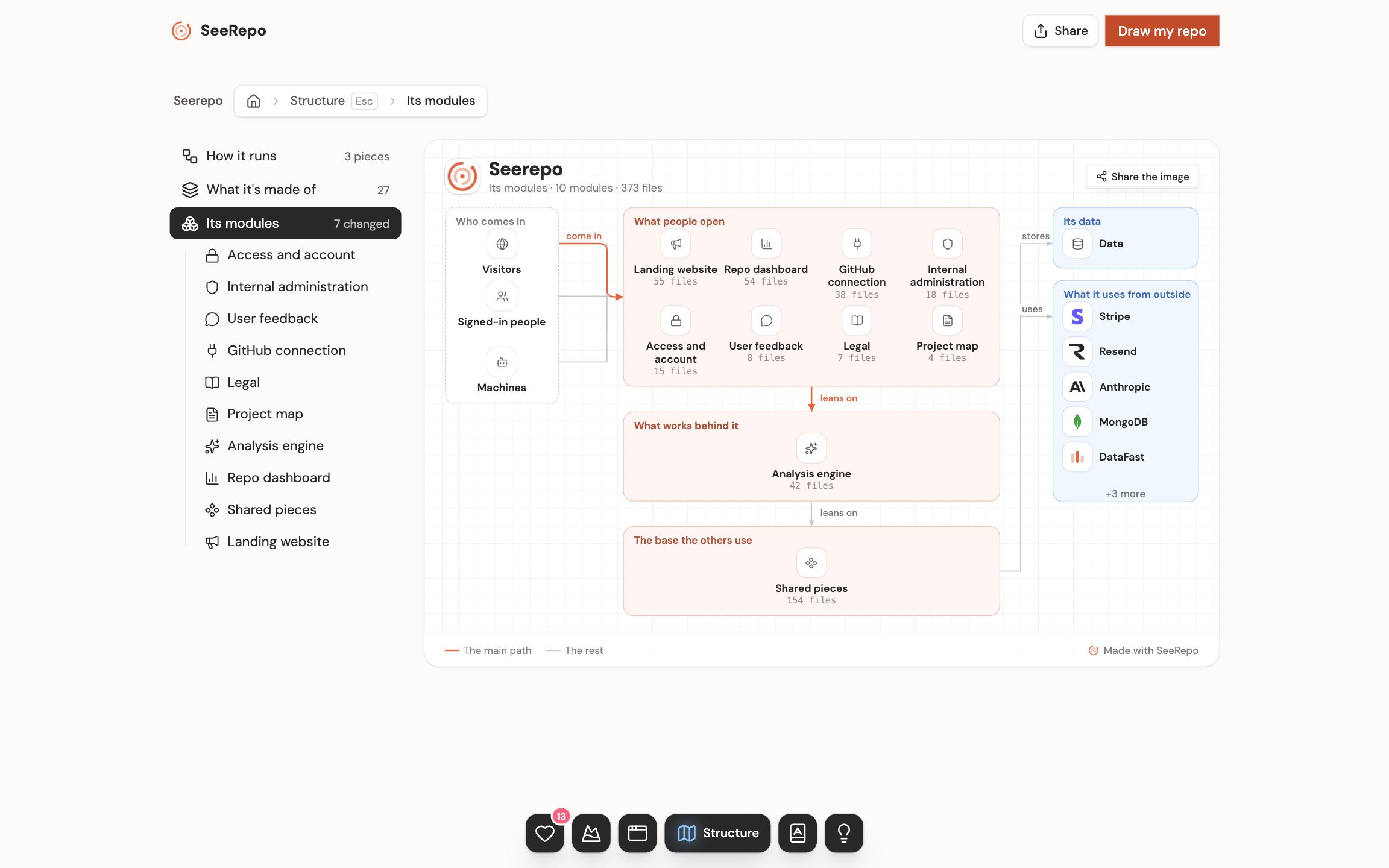
On a narrower screen it says the same, going down. Your modules go under the plan's three titles, in its same order: what people open, what works behind and the base the others use. At the end, who comes in and what it uses through a library. Each module looks like this:
- On top, the place's name and one line with its modules, its parts and its files and, at the root, its lines: "11 modules · 3,409 files · 142,000 lines".
- Each module is a dashed box with its name, when it changed, like "Changed 1 week ago", and a small curve of its days with work in the last 30, if it had any. It counts days, never commits. Inside, its submodules and its parts, each in its tile with what it does: up to three, then "+6 more".
- The dots running along the lines say where the work is: fast where it changed a lot this week, slow where it changed this month. Where nothing was touched in 30 days, none runs.
- On a computer there are two modules to a row. On a phone they go one under the other, with their line on the left. It always reads going down, never sideways.
- A part the reading left with its file's name is called by where it is, in code type: a screen by its address ("/admin/email") and any other file by its folder and name ("marketing/layout.tsx").
Going in and out
- What carries an arrow goes in. Touching a module shows the same drawing, one level in: on the left who comes into that module, in the middle all its parts and on the right what it uses, the other modules too. That repeats at any depth.
- The lines reach the module's box, not a part: which part uses what is in that part's sheet.
- +6 more goes into the whole module.
- If opening takes a moment, the arrow turns into a wheel.
- A part without an arrow opens its sheet. See A part's sheet.
- To go up: the path on top (your project › Structure › Modules › each module), Escape or the browser's back. The path always names the question you're in, the first one too: "Structure › Blueprint". Escape goes up one step at a time: from the module to Modules, from there to the first question and from there to your project. Going up brings you back to where you were; going down, each place opens at its top.
- To go somewhere else you don't have to go up: the menu takes you to any module or to another question from wherever you are. If you touch another while the first is loading, the last one wins.
- A module with no parts says so: "This module has no parts yet."
- If the project follows two branches, the tabs beside its name switch between their maps. See Follow a second branch.
Technologies
On a wide screen it's a plan that fits in a screenshot: on the left your code, with its language and its lines, and on the right what it uses, in three bands and by groups. What people recognize has its logo; the rest gathers on "+4 more", which opens its list when you touch it. A group with nothing known shows its first name and how many more there are, and opens the same way.
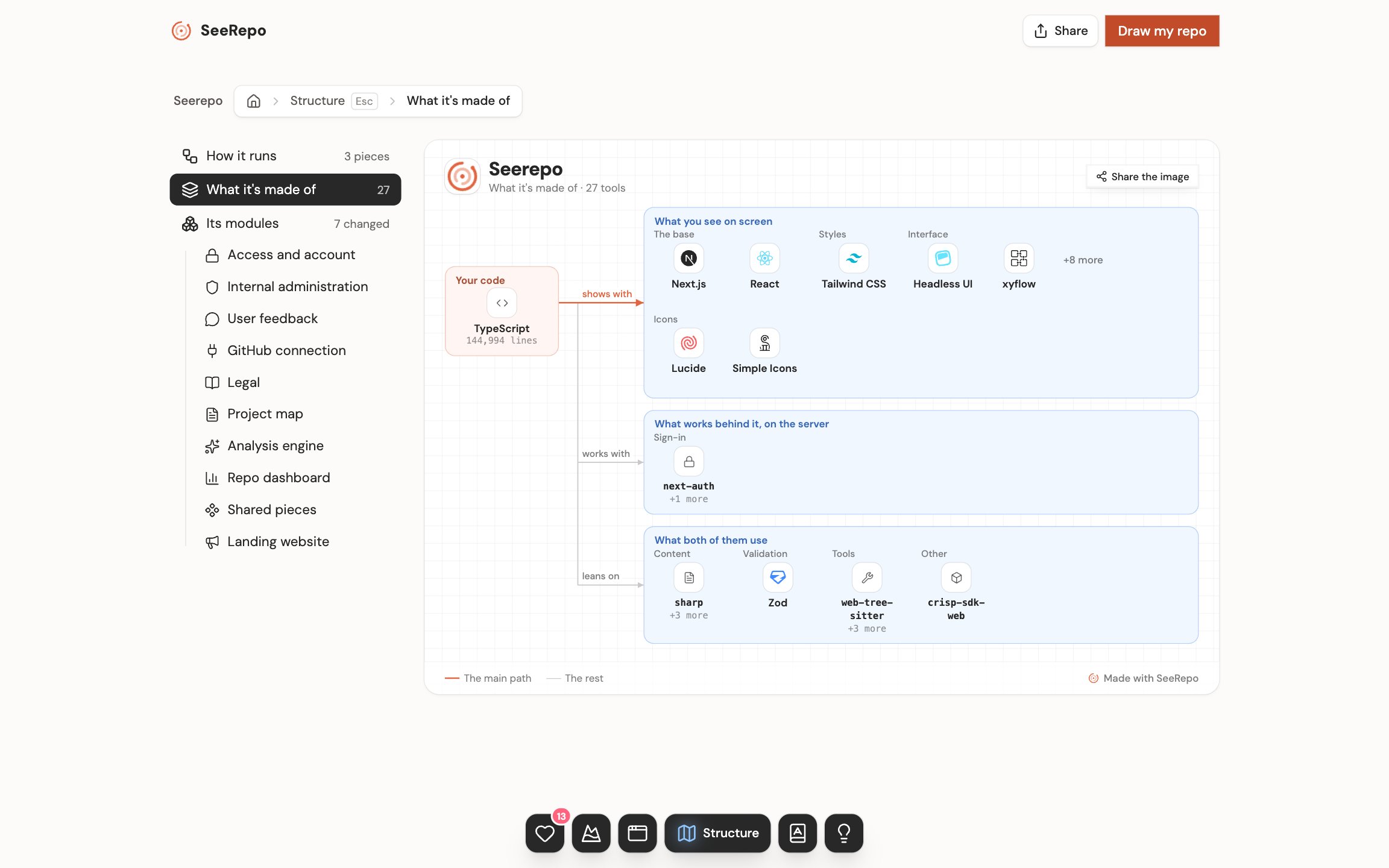
On a narrower screen it's another tree: Frontend (what you see on screen), Backend (what works behind it, on the server) and Support (what both of them use). On top it says what it's written in, like "Written in TypeScript". From each side hang its groups, like The base, Styles, Interface, Data, Sign-in, AI, Services or Testing, and in each group its tools with their logos: first what has a logo anyone knows, and the rest one touch away.
What SeeRepo couldn't read
At the foot of Technologies, when there's something it didn't read: the links between files (imports) that lead nowhere, the parts it hasn't sorted yet and the generated files, left out.
On a free repo
A free repo read whole is walked the same way, without dates or figures, which come with a plan; above its modules, one line says what a plan adds, with its button. One read at its first level only shows its modules with a lock, says so once above them, and the menu doesn't list them; touching one shows you the plans.
The part that changes most opens whole, with what it does and its history, so you see what you pay for before paying. The top of the page says which one it is, and a link opens its sheet. If the repo had no changes in 90 days it opens anyway, and doesn't say it's the one that changes most.
A push brings the tree up to date on its own, with nothing for you to do.