A part's sheet
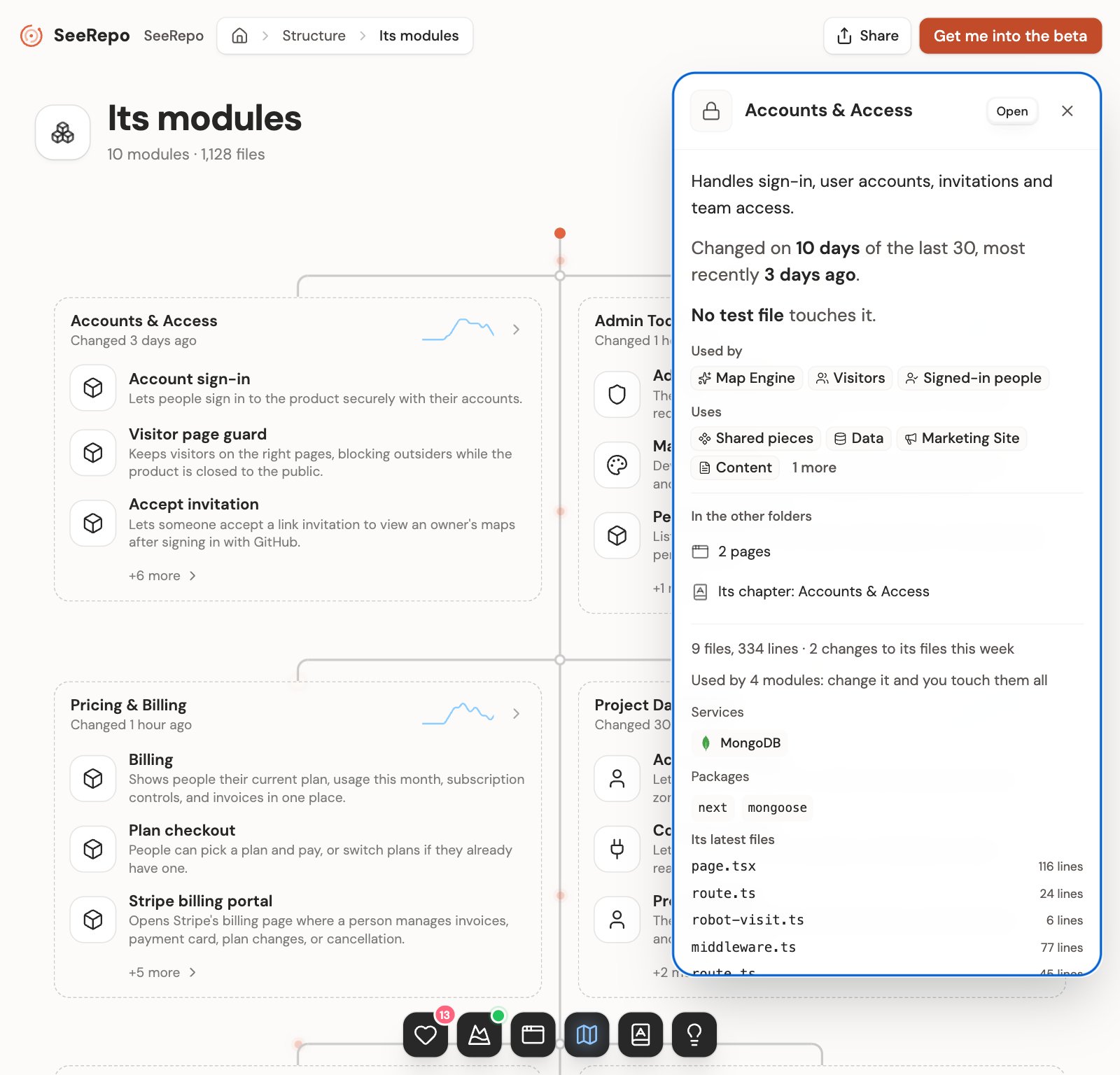
Touch a part in Structure and its sheet opens beside the drawing (on a phone, from the bottom): what it does in plain words, how it connects, and who made it, people and agents. On top, its name, and under it where it lives: a screen's address or its file's path. On a module's sheet, which you reach by a link or from the names on another sheet, Open next to the X goes inside it.
While the sheet is open, the browser's address names it: copy it to send that part to anyone with access to the map. Reloading keeps it, and the back button closes it and leaves you where you were. If you go to another module or folder with the sheet open, back brings you to it again.
The note
The first time you open a part, SeeRepo writes what you need to know about it in two to four short paragraphs. The parts it names are chips you can click. While it writes, the sheet isn't empty: it shows what it already knows of the part, below, and the note takes its place when it arrives. If it couldn't be written, that stays.
Its activity and its tests
When there's no note yet, the sheet opens with the part's sentence, what it does in one line, and then the facts:
- Who changed it: if nobody did in 90 days, "Nobody touched it in the last 90 days."
- Its activity: "Changed on 4 days of the last 30, most recently yesterday.", or "No changes in the last 30 days."
- Its tests: "60% of its files have their own test.", or "No test file touches it."
- If your automatic tests (CI) fail and the error may come from this part, it says so beside its name: May come from here.
What it connects to
Used by and Uses list the parts that use it and the ones it uses, four at a time, then "3 more". Each name can be touched and takes you to that part. A part with no ties says "Nothing else on this map is tied to it." They're always there, under the note too: the note names some of those parts as chips, and the two lists say them all.
In the other folders
What the other folders have of this part, and only if they have something: how many things it has to fix, which opens the most serious one in Health; its page, which opens its sheet in Pages, and its chapter in the Wiki. A visitor of a public map only sees what can be shown to them, and on a free repo it doesn't show.
What SeeRepo knows of it
Under the note or the facts:
- Its size and pace: "1 file, 240 lines · changed 9 times this week". A module counts the changes to all its files: "153 files, 12,400 lines · 1,052 changes to its files this week".
- Its reach: "Used by 5 modules: change it and you touch them all", when more than one module of your product uses it.
- Services: the outside ones it calls, with their logos. Packages: the ones it imports, up to five, and how many more.
- Why it's here: the reason SeeRepo put it in its place, like "Next.js page file".
- Its latest files, on a module: the five that changed last, each with its lines, and a click opens it on GitHub at the version SeeRepo read.
Made by
The faces of who changed it, agents and people. If you own the repo, you can invite a person from here.
Its code
On a part that is a file, See the code on GitHub opens it at the version SeeRepo read. Someone invited to the map is told: "Opens if you have access to the repo on GitHub." On a public map it only shows if the repo is public on GitHub too, and a visitor is also told: "This repo's code never leaves it."
At its foot, the sheet says where your agent reads this same part: SeeRepo's connector. See Connect your agent with MCP.
On a free repo
The sheet shows the part's name and where it lives. The rest comes with a plan, and it says so there: "What it does and its history come with a plan". The sample part opens whole: see Structure.
Want your agent to fix something? The prompts live in Health: one per task, with the files your agent should read.