Pages from outside
Outside is what Pages, folder 3 in the dock, knows about how Google and AI see you. It's in the Visibility section and in each public screen's sheet. SeeRepo reads it from your code and your published site, and each thing comes with the file and line that prove it.
What it checks on each page
The title, the description, the main heading (H1), the canonical address, whether it's in the sitemap, whether it asks not to show on Google, what robots.txt tells Google and ChatGPT's search, the image and the card to share it, the structured data (JSON-LD) and its versions in other languages.
What robots.txt tells the robots that train AIs is reported without judging: training isn't searching, and it's your call.
In a screen's sheet
- What it's missing also carries what's wrong outside, each thing with its source (Google, When shared or AIs), in the same list as what it lacks inside and with the same prompt. How it gets found keeps what's right folded, and under it what was measured.
- On Google, When shared and For AI assistants, three of What it is's views: how the search engine would show it with its title and description, the card that shows up when its link is pasted, and what an assistant can read.
- From Google: with Search Console connected, its clicks, the times you showed up, out of 100 how many came in and what place it shows up in, in 28 days. Under them, its period before with its arrow, or "New in Google" if it didn't show then; What people search for, the searches that bring it most; and, on a template like
/blog/[slug], The addresses Google showed most, each one opening on your site. If Google inspected it, Which URL Google inspected says whether it's in its index. - How it loads: its PageSpeed score on a phone and a sentence. Unfolded, the test timings (LCP, CLS, TBT) and people's real experience (CrUX, INP) when Google has a sample.
Pages hidden on purpose, like a demo or a test page, don't count as a failure: their own code asks not to show on Google, and that's your call.
In Visibility
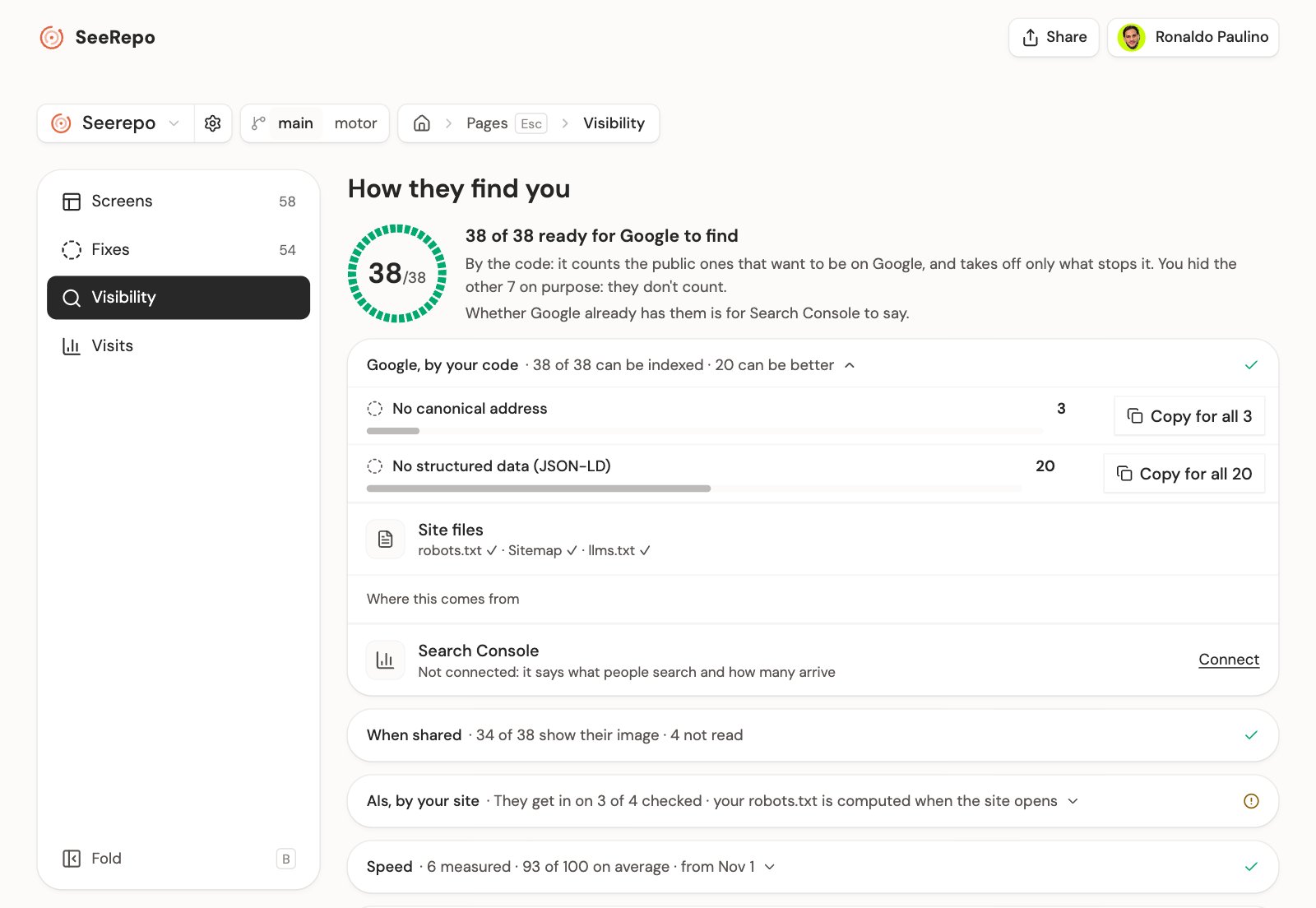
In Pages, the Visibility section counts how many of your public screens can be on Google and takes off only what stops it; the ones hidden on purpose go apart. Below, four doors: Google, by your code, When shared, AIs, by your code and Speed, each with its figure. The one with something to improve comes open; tap another to open it, if it holds anything. A source that read nothing says how many are left unread, not a zero. If your robots.txt is computed when the site opens, the code can't say whether the AIs that search get in: the door is then named AIs, by your site and says on how many of the pages checked your published site let them in. With no reading of the site either, it says why it couldn't be read. Search Console goes inside Google, for the owner only.
Your site
In Visibility, what's your site's goes inside the door it belongs to:
- Site files, inside Google: whether your app has robots.txt, a sitemap and llms.txt.
- AIs that train, inside AIs: whether they get in on the pages checked, with "your call" beside it.
Under the files, Where this comes from opens each file and each robot with the rule that lets it in or not, and its file and line. If your repo has several apps, a menu on those two rows picks which one, and both doors change together.
Your published site
If your project has an address, SeeRepo asks for your public pages once a day, up to 25, compares what arrives with what your code says and measures each one's speed with PageSpeed. It asks with its own name, without pretending to be a search engine. What comes from your site, captures included, is kept until the next day. Without an address only the code is checked: you write it in the project's settings, under Website.
Google and the speed
- Search Console is connected by the owner, with Connect on the Search Console row, inside the Google door of Visibility, or from the project's settings. The numbers arrive with the next reading.
- PageSpeed doesn't need connecting: SeeRepo measures with its own key.
Fix one with your agent
A public page's sheet prompt adds the outside to what it's missing inside. For example:
Page: Pricing
Project: your-name/your-repo
Route: /pricing
File: app/pricing/page.tsx

Known problems

- Add a canonical address: `alternates.canonical` with its own route, /pricing.
- Add /pricing to the sitemap so search engines find it.

Outside evidence:
- canonical: WARN · app/pricing/page.tsx:3
- inSitemap: WARN · app/sitemap.ts:8

Do not treat optional improvements or privacy decisions as failures.

Check affected states and preserve intentional access restrictions. After the change, read the code again and, when applicable, the published site. State what you verified and what remains unchecked. One capture does not verify every state.
Who sees what
- On the free plan: how many public pages you have. What it checks on each one, the site's files, the reading of your published site, the speed and the Google numbers come with a plan.
- Whoever visits a public map: what it checks on each page and the site's files, without your Google numbers, the card when shared, captures or the pages that open with a link.
What it reads
For now, Next.js (App Router and Pages Router) and static HTML. On other stacks, the outside doesn't show yet.